
Définir un·e administrateur·rice du groupe
Créé il y a 6 mois
Pour les groupes Simple ou Premium, l'administrateur·rice est celui·celle qui a créé le groupe. Il n'est pas possible d'en changer ou d'en ajouter.
Pour les groupes Premium Pro, l'administrateur·rice principal·e (la personne qui a créé le groupe) peut désigner d'autres administrateur·rice·s parmi les membres du groupe. Il suffit d'aller sur votre groupe puis d'appuyer sur le nombre de membres. Dans la liste des membres appuyer sur le menu … du membre que vous souhaitez désigner comme administrateur·rice et choisir Désigner admin.
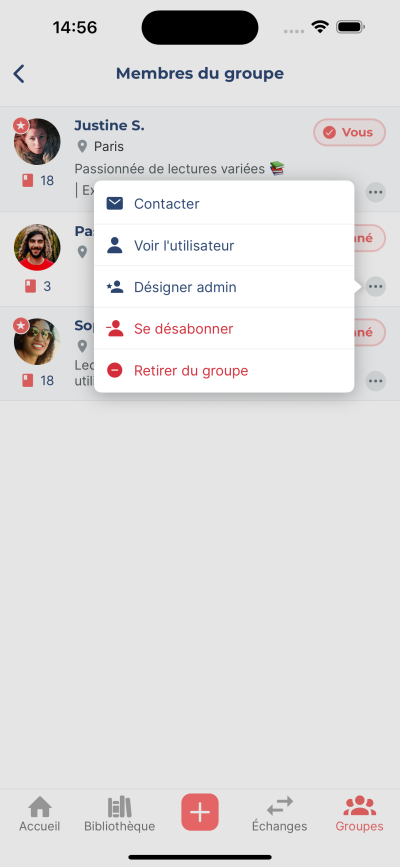
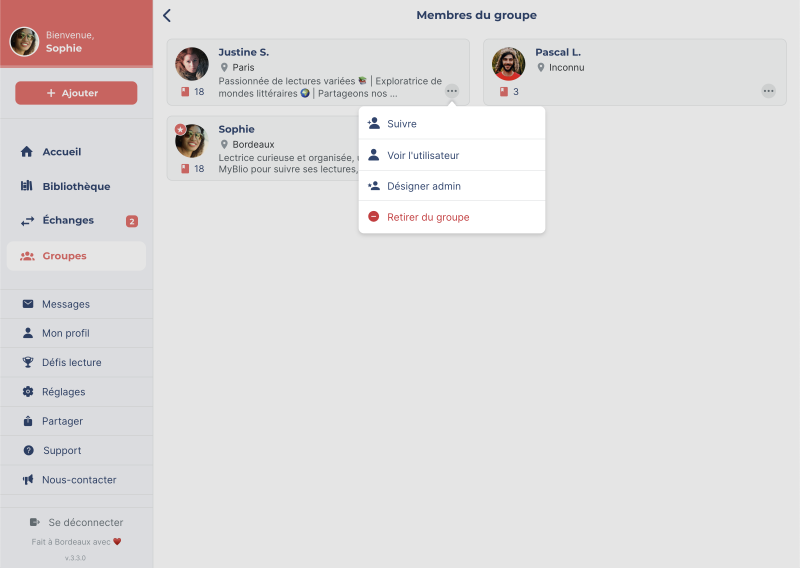
Les administrateur·rice·s désigné·e·s peuvent :
- Modifier les informations du groupe
- Retirer des membres du groupe
- Accepter ou refuser les demandes de rejoindre le groupe
- Gérer les collections (Premium et Premium Pro uniquement)
- Ajouter ou retirer d'autres administrateur·rice·s (Premium Pro uniquement)
- Utiliser l'option libre-service pour ses livres (Premium Pro uniquement)
- Utiliser l'option disponible sur place pour ses livres (Premium Pro uniquement)
📝 Note : Pour retirer un·e administrateur·rice désigné·e, il suffit de suivre la même procédure que pour le désigner, puis de choisir Retirer des admins.