Gérer les lectures d'un livre
Créé il y a un an
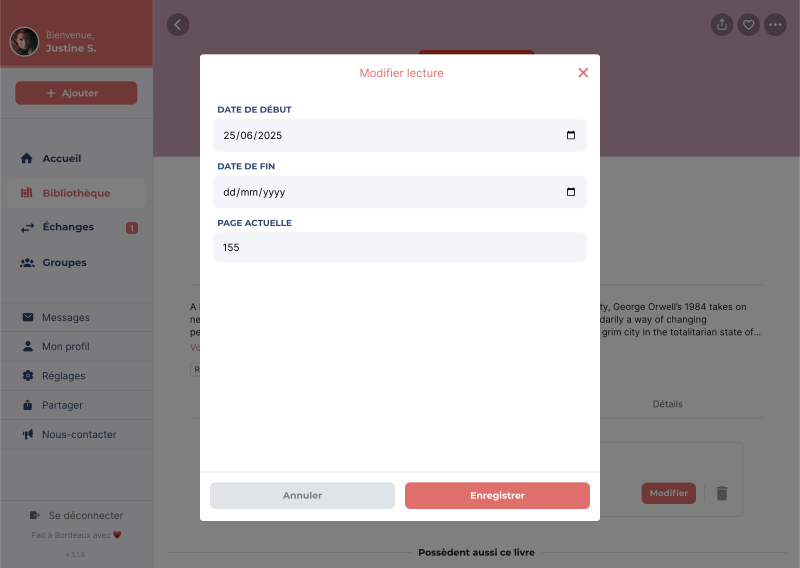
En plus de pouvoir indiquer l'état de lecture de vos livres, il est possible de gérer plus en détail chacune des lectures associées à un livre. Par exemple, vous pouvez noter précisément la date de début et de fin, ainsi que la page actuelle. Pour accéder aux lectures d’un livre, rendez-vous sur la fiche détaillée du livre depuis votre bibliothèque, puis appuyez sur l’onglet Lectures.
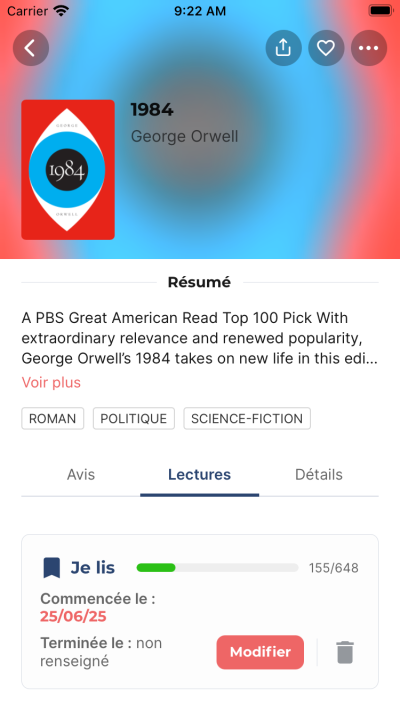
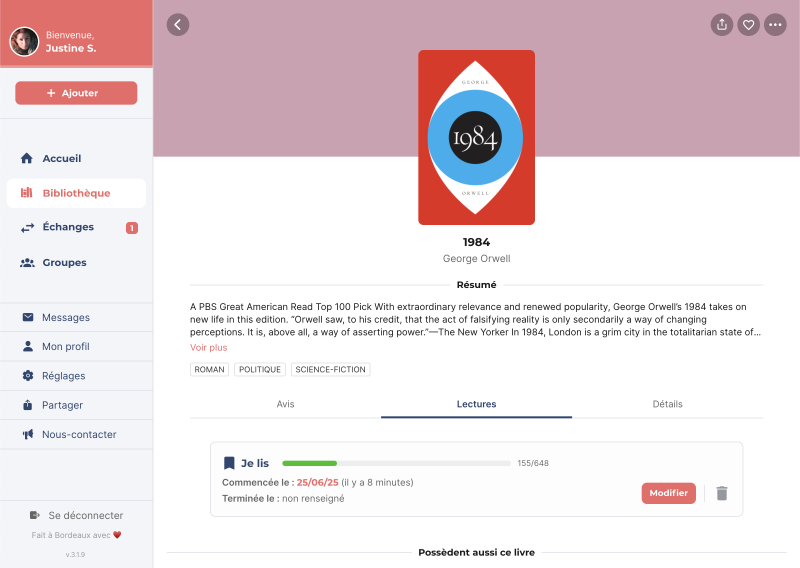
Lorsque l'état de lecture d'un livre est Je lis ou J'ai lu, une lecture est automatiquement créée. La date de début correspondra à la date à laquelle l'état de lecture est passé à Je lis, et la date de fin sera celle à laquelle l'état est passé à J'ai lu. Il est possible de modifier ou supprimer une lecture.
Éléments modifiables :
- Date de début : le jour où vous avez commencé la lecture.
- Date de fin : le jour où vous avez terminé la lecture.
- Page actuelle : la page où vous en êtes dans votre lecture. Cet élément s'affiche uniquement si la date de fin n'est pas renseignée.